Ever wanted your WooCommerce cart page to automatically detect a customer’s location and pre-fill the shipping calculator? Good news — it’s possible with just a bit of code and WooCommerce’s built-in geolocation features.
In this post, I’ll walk you through how to set it up step by step — no plugin required!

What We’ll Cover
- Why use geolocation on the cart page
- How to enable WooCommerce’s geolocation feature
- A ready-to-use code snippet to auto-fill the shipping calculator
- Bonus tips for improving accuracy
Why Use Geolocation?
Using geolocation can significantly enhance the shopping experience. It allows your store to show accurate shipping estimates without requiring customers to enter their location manually. This convenience can help reduce cart abandonment and speed up the overall checkout process, making customers more likely to complete their purchases.
Step 1: Enable Geolocation in WooCommerce
WooCommerce includes geolocation features by default, but you need to turn them on.
Here’s how:
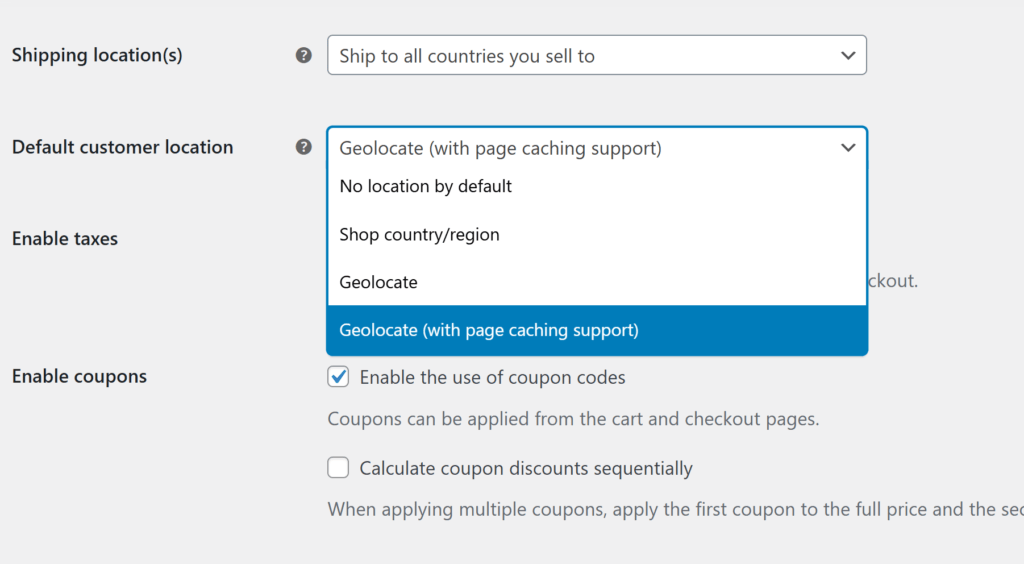
- In your WordPress dashboard, go to: WooCommerce > Settings > General
- Scroll down to Default customer location.
- Choose: Geolocate (recommended if you’re only using this for the cart page)
or
Geolocate (with page caching support) (recommended if you’re using caching plugins and want this support on all pages of your website) - Save your changes.
Step 2: Set Up MaxMind Geolocation (Optional but Recommended)
WooCommerce uses the MaxMind GeoIP database to get accurate country and state data.
Here’s how to enable it:
- Go to WooCommerce > Settings > Integration
(or it may be under WooCommerce > Settings > General, depending on your version) - Find the MaxMind section.
- Create a free MaxMind account at https://www.maxmind.com and get your license key.
- Enter the key into the settings and save.

Step 3: Add the Auto-Fill Snippet
Now it’s time to add the code that will pre-fill the shipping form using the user’s geolocated country and state.
Paste this code into your theme’s functions.php file:
add_action('woocommerce_before_cart', 'auto_fill_shipping_calculator_with_geo');

function auto_fill_shipping_calculator_with_geo() {
    if (is_cart()) {
        $geolocation = new WC_Geolocation();
        $user_ip = $geolocation->get_ip_address();
        $location = $geolocation->geolocate_ip($user_ip);

        if (!empty($location['country'])) {
            ?>
            <script type="text/javascript">
                document.addEventListener('DOMContentLoaded', function () {
                    const countryField = document.querySelector('#calc_shipping_country');
                    const stateField = document.querySelector('#calc_shipping_state');

                    if (countryField && countryField.value !== '<?php echo esc_js($location['country']); ?>') {
                        countryField.value = '<?php echo esc_js($location['country']); ?>';
                        const event = new Event('change');
                        countryField.dispatchEvent(event);
                    }

                    <?php if (!empty($location['state'])) : ?>
                    const interval = setInterval(() => {
                        if (stateField && stateField.options.length > 1) {
                            stateField.value = '<?php echo esc_js($location['state']); ?>';
                            const changeEvent = new Event('change');
                            stateField.dispatchEvent(changeEvent);
                            clearInterval(interval);
                        }
                    }, 500);
                    <?php endif; ?>
                });
            </script>
            <?php
        }
    }
}
What This Snippet Does:
- Detects the user’s IP address
- Geolocates their country and state using WooCommerce’s tools
- Uses JavaScript to pre-fill the country and state dropdowns in the shipping calculator
Bonus Tip: Auto-Trigger the Shipping Update
If you want the shipping costs to update as soon as the location fields are filled automatically, you can take it one step further by extending the script to click the “Update Totals” button programmatically. This creates a seamless experience for the customer by instantly calculating shipping without them having to take any additional action.
Updated Code Snippet with Auto-Trigger
Replace the earlier script inside your functions.php with this version:
add_action('woocommerce_before_cart', 'auto_fill_shipping_calculator_with_geo');

function auto_fill_shipping_calculator_with_geo() {
    if (is_cart()) {
        $geolocation = new WC_Geolocation();
        $user_ip = $geolocation->get_ip_address();
        $location = $geolocation->geolocate_ip($user_ip);

        if (!empty($location['country'])) {
            ?>
            <script type="text/javascript">
                document.addEventListener('DOMContentLoaded', function () {
                    const countryField = document.querySelector('#calc_shipping_country');
                    const stateField = document.querySelector('#calc_shipping_state');
                    const updateButton = document.querySelector('button[name="calc_shipping"]');

                    let locationSet = false;

                    function triggerUpdate() {
                        if (updateButton && locationSet) {
                            updateButton.click();
                        }
                    }

                    if (countryField && countryField.value !== '<?php echo esc_js($location['country']); ?>') {
                        countryField.value = '<?php echo esc_js($location['country']); ?>';
                        countryField.dispatchEvent(new Event('change'));
                        locationSet = true;
                    }

                    <?php if (!empty($location['state'])) : ?>
                    const interval = setInterval(() => {
                        if (stateField && stateField.options.length > 1) {
                            stateField.value = '<?php echo esc_js($location['state']); ?>';
                            stateField.dispatchEvent(new Event('change'));
                            clearInterval(interval);
                            locationSet = true;
                            setTimeout(triggerUpdate, 500); // give time for DOM updates
                        }
                    }, 500);
                    <?php else: ?>
                    // If no state is needed, trigger update directly
                    setTimeout(triggerUpdate, 500);
                    <?php endif; ?>
                });
            </script>
            <?php
        }
    }
}
What’s New:
- Adds logic to auto-click the “Update Totals” button after filling in the fields.
- Uses a short delay to allow the form to update correctly before triggering the button.
Final Thoughts
Geolocation is a powerful way to streamline the shopping experience on your WooCommerce store. By automatically detecting your customer’s location and pre-filling the shipping calculator, you can remove unnecessary friction, speed up the checkout process, and boost your conversion rates — all with just a small snippet of code.
If you have questions, need help tailoring this to your theme, or want to take your WooCommerce setup to the next level, we’re here to help.
👉 Need expert help? At Nahnu Media, we specialize in WordPress websites, custom development, and high-performance hosting. Whether you’re launching a new store or optimizing an existing one, our team can build, customize, and support a solution that fits your goals.
Let’s build something awesome — contact Nahnu Media today!